Read:08 | SQL (Structured Query Language)
Lessons: SQL Bolt Lessons
Additional Resources to skim: A Primer on SQL (downloadable PDF Book) | SQL Cheat Sheet
Notes from SQL Bolt Lessons
Retrieving data
- To retrieve data form a SQL database, use
SELECTstatements - A “table” in SQL is a type of entity, while each row is an instance of that type
- Columns are properties shared by all instances (rows) of the entity (table)
-
A simple select statement:
SELECT column, another_column FROM mytable; - The
*shorthand means “all columns” and can be used in SELECT:SELECT * FROM mytable - A
WHEREclause takes a condition to find a specific set of rows -
Here are some operators that can be used with
WHERE: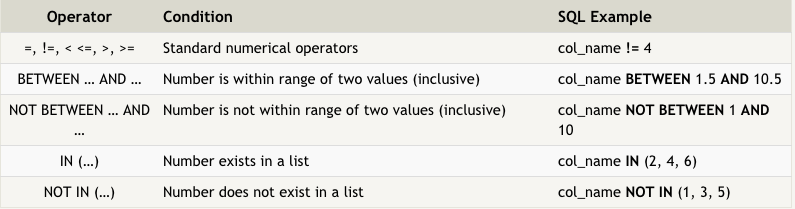
- All strings in queries must be quoted so the parser knows they are not SQL keywords
-
Here are some operators that can be used for text columns:
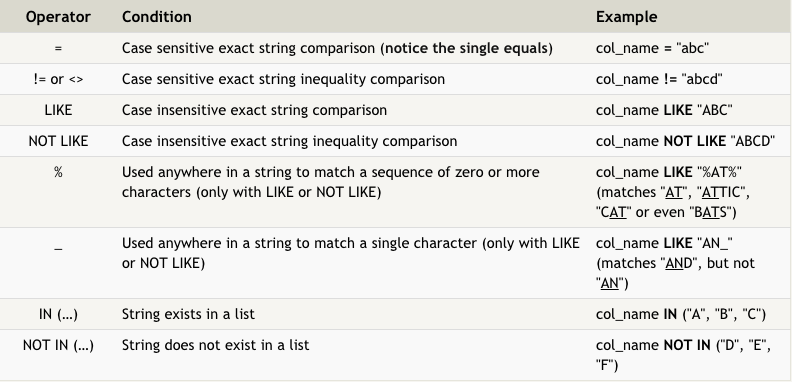
- Duplicate rows can be removed with
DISTINCTkeyword ORDER BYhelps sort data. For example:ORDER BY column ASCLIMITreduces the number of rows returned, andOFFSETsays where to start counting rows from.
Modifying data
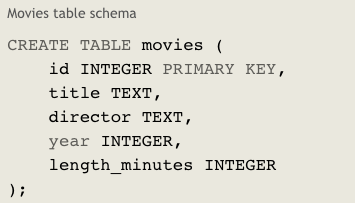
- A “schema” describes the structure of the table and data types of each column. For example, the year column should be an integer and the title should be a string.
-
INSERTquery puts rows into the table into the specified columns. Here is an example: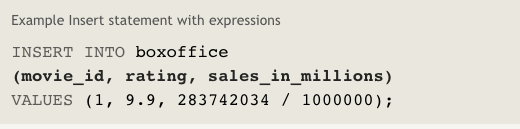
VALUESfor the INSERT are listed in parentheses.-
UPDATEqueries update rows in the database.Note: Always use a
SELECTquery to make sure you are updating the right rows before updating.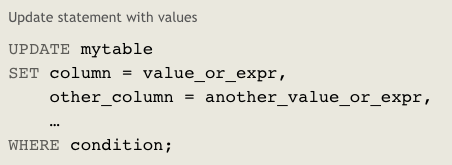
DELETEqueries delete rows from the database.- Use a
WHEREcondition withDELETEor ALL rows will be deleted. You can also test this withSELECTfirst.
Modifying the schema
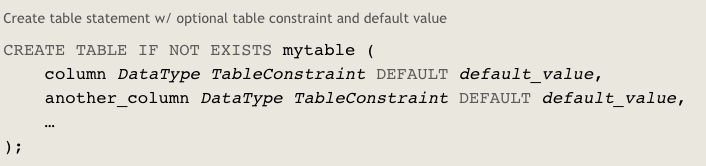
- You can create new tables with
CREATE TABLE IF NOT EXISTScan be added to avoid an error in case the table already exists.-
Here is an example:
-
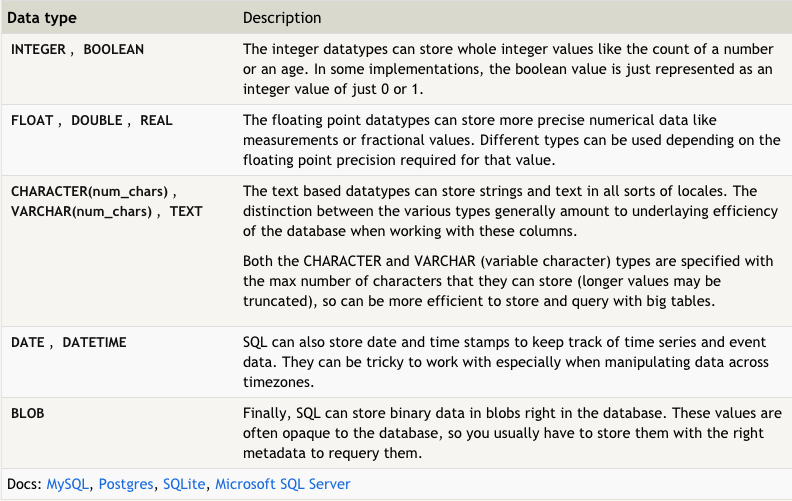
Below are some of the common data types available for columns:
-
Here is an example schema for the table used in this exercise:
-
ALTER TABLEcan add, remove, or modify columns in a table that already exists. Here is an example: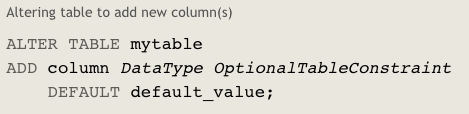
-
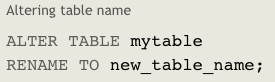
Here is an example of renaming a table:
- Within an
ALTER TABLEquery, you can delete a column with theDROPkeyword. -
You can remove an existing table entirely using
DROP TABLE IF EXISTS movies.