Read:06 | Node.js
Website: Intro to Node on Sitepoint
Notes on Node.js
- Node.js basically translates your JS files into binary for a server to read
By the end of this article, hopefully StackOverflow’s definition will make sense:
Node.js is an event-based non-blocking asynchronous I/O runtime that uses Google’s V8 JavaScript engine and libuv
- Node is built on Google Chrome’s V8 open-source JS engine
- Use a version manager to grab Node binaries for your system
- It negates potential permission issues when using Node with npm
- Lets you set a Node version on a per-project basis
- You can check what version of Node is installed by typing
node -v - You can run your file with Node by typing
node hello.js - Node comes bundled with a package manager called
npm. You can check which version you have installed by usingnpm -v. - To globally install a package, you use
-glike this:npm install -g jshint - To learn about linting, see this article: A Comparison of JavaScript Linting Tools
npm initwill create apackage.jsonfile in whatever folder you are in.- If you run
npm installit will create thenode_modulesfolder, which contains any libraries that are referenced as dependencides in yourpackage.json - Also check out A Beginner’s Guide to npm — the Node Package Manager.
- Basically, installing (is the purpose of npm) and running (is the purpose of node) various build tools for developing a modern JS application.
- To develop with a JS framework like React you must know how to use Node and npm (and maybe yarn)
- The biggest use case for Node.js is for running JS on the server
-
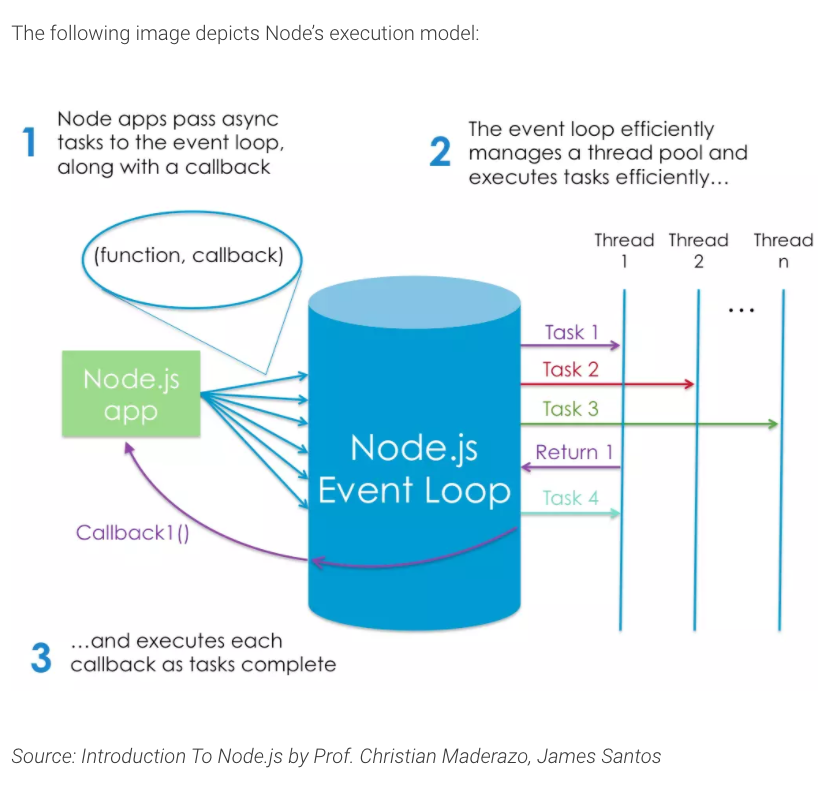
Here’s an image that explains the event-driven aspect of Node.js:
-
Node’s execution model causes the server very little overhead, which makes it capable of handling a lot of simultaneous connections:
- The arrival of ES6’s native Promises followed closely by async/await minimizes the downside of Node (excessive callbacks).
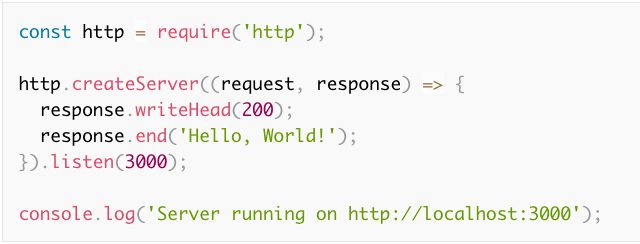
- Node has a native
httpmodule that uses thecreateServermethod.- It takes an anonymous function with 2 arguments:
requestandresponse. - This function is invoked every time a new connection is made to the server.
- We tell the server to listen on a particular port number and have it output a message to let us know it is running.
- It takes an anonymous function with 2 arguments:
- Node is used for building applications that require real-time interaction like chat sites.
- There are various frameworks that can reduce the boilerplate, like express.
- If you want to do anything out of the ordinary you need to pull in additional modules with npm.
- Node’s big plus is that is speaks JSON, which is the language used for interacting with object databases (like MongoDB).