Read:05 | Heroku
Website: Heroku Setup
Notes from setting up Heroku
- To work with Heroku, be sure to set up a free account
- Install node.js and npm locally
- Heroku requires Git
- Install using the command line on a macOS with
$ brew install heroku/brew/heroku - After installation, run
heroku login - check your
--versionofnode,npmandgit
Deploying a Demo App
- you can
git clonethe link on their setup site - Note: the
package.jsonfile is Node’s dependency manager - If you’re cloning from a GitHub repo, you need to run
heroku createto replaceoriginwhen pushing / fetching to your Heroku app sinceoriginwill be attached to the GitHub repo you cloned. - To copy the cloned GitHub repo to your Heroku app, run
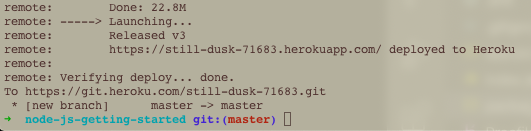
git push heroku master - At the end of the push run the command line under “launching….” section whill read out your URL for the app - see image for example:
You can see logs on your Heroku account when in your app dashboard under More > View logs or in the terminal by running a logging command. Just press ctrl+C to get out of the logs.