Read:03 | Mustache & Flexbox
Article: Templating with Mustache & Article: A Guide to Flexbox
Templating with Mustache
- Mustache is a logic-less template syntax using values provided in a hash or object
- mustache.js uses a mustache template system in JS, considered the base for JS templating.
- This is a specification for templating language that is compiled by a templating engine (like html) that will be rendered to create the output.
- To use mustache with Node and Express, it’s ideal to use mustache-express
- You can install it using npm
> npm i mustache-express
- You can install it using npm
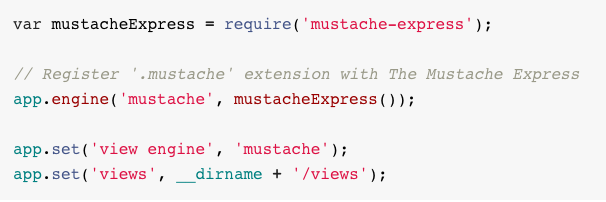
- Screenshot from mustache-express on how to configure it in the JS file:
- In router config use
res.render(TEMPLATE_NAME, JASON_DATA)Ex:res.render('hello', {"name": "Tiffany"}) - It also take a var name like this:
let nameObject = {"name": "Tif"}
res.render('hello', nameObject)
A Guide to Flexbox
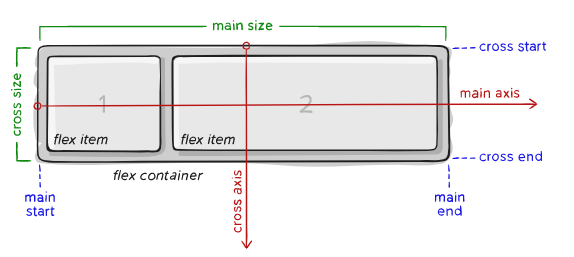
- The
displayproperty defines the container that will have children referred to as “items”
.container {
  display: flex;
}
- You can set
flex-directionin the containerroworcolumn - In the container, there is
flex-wrap, which by default will try to fit all items on one line. You can change the value of this property withnowrap,wrap, orwrap-reverse.
Note: you can shorthand
flex-directionandflex-wrapwithflex-flow: column wrap
- The
justify-contentproperty dictates the horizontal starting point and the space definition of the items (on the main axis). - The
align-itemsproperty will dictate where items start from a vertical alignment perspective (on the cross axis). - Using the
align-contentproperty you are justifying all of the items as a group within the main axis. - Children are considered the
flex itemsof thecontainer. - Items by default are in source order, but you can use the
orderproperty to control which order they appear in the container (order: 1,order: 2, etc.). - The
flexproperty is a shorthand for dictatingflex-grow,flex-shrink,flex-basis(the last two are optional).- The default is
flex: 0 1 auto
- The default is
- To have an item override the default alignment from
align-items, you can use the propertyalign-self.